Last week, we hosted a private GTMfund Claude Code workshop for founders alongside AI expert, Jordan Crawford. Across that session and in conversations with hundreds of founders and GTM leaders each month, this is something we’re hearing:
Interestingly, the biggest blocker around AI for people isn’t always technical, but rather involves the imagination – knowing what is actually possible.
We wrote this edition to help unblock the imagination block, specifically for people who run go-to-market.
Why specifically Claude Code? Dan Shipper of Every offered a brilliant analogy: “The cloud app is like a hotel room, clean, set up for you, but you start fresh each time. Claude Code is like having your own apartment with AI in it.”

This edition gives you the apartment tour. Setup in 5 minutes, then 30+ use cases across every GTM function, with the exact prompts to get started.


HockeyStack is the AI platform for modern GTM teams. It unifies all your sales and marketing data into a single system of action. Built-in AI agents help teams prospect the right accounts, improve conversions, close and expand deals, and scale what works.
That’s why teams like RingCentral, Outreach, ActiveCampaign, and Fortune 100 companies rely on HockeyStack to eliminate wasted spend, take better decisions, and make space to think. Learn more at hockeystack.com

Outbound sales today is still built around manual work: writing emails, building lists, and managing sequences across disconnected tools.
Nooks is breaking the mold. With their new AI Sequencing product, Nooks is an agent workspace where AI works alongside reps, helping them understand accounts, prioritize the right prospects, and generate context-rich outreach based on actual first-party interactions.
No more wasting time in multiple tools – it’s one unified workspace for all your outbound channels. Arm your sales team with intelligent outbound. Learn more at nooks.ai.
First, What is Claude Code (and why should you care)?
Claude Code is Claude running in your terminal, that text-based interface your computer already has. Think of it as an execution layer, rather than a coding tool.
Where the regular Claude chat is a brilliant advisor you talk to, Claude Code can actually do things on your machine:
- Access all your local files: no uploading, no size limits. Drop 500 call transcripts into a folder and tell it to analyze them.
- Run for hours on complex tasks. The cloud app times out. Claude Code keeps going.
- Execute multi-step workflows: it plans, acts, checks its work, and iterates. Not a chatbot, a true agent.
- Install and use tools: it can set up scripts, connect to APIs, browse the web, and create files directly on your machine.
- Work across every file type: PDFs, CSVs, audio files, images, and spreadsheets. If it’s on your computer, Claude Code can work with it.

Boris Cherny, the creator of Claude Code, originally built it as an internal tool at Anthropic. It wasn’t supposed to be a product. But people started using it for way more than coding – for organizing files, writing status updates, and automating busywork. The use cases just kept expanding.
If you’re already using Claude Cowork (the GUI version that shipped in January), think of Claude Code as Cowork with training wheels removed, faster, more flexible, and with more direct access to your system. Both use the same underlying agent architecture.
Install Claude Code in 5 Minutes
This is the part that scares people. It shouldn’t. Here’s the entire process:
Step 1: Open Your Terminal
On Mac: Press Command (⌘) + Space, type “Terminal,” and hit Return.
On Windows: Press the Windows key + R, type “wt,” and press Enter.
Step 2: Install Claude Code
Mac:
curl -fsSL https://claude.ai/install.sh | bash
Windows:
irm https://claude.ai/install.ps1 | iex
Step 3: Launch It
claude
That’s it. You’ll be prompted to log in with your Anthropic account. Claude Code works with any paid Claude plan ($20/month Pro or $100/month Max for heavier usage).

The Use Cases: A GTM Operator’s Claude Code Playbook
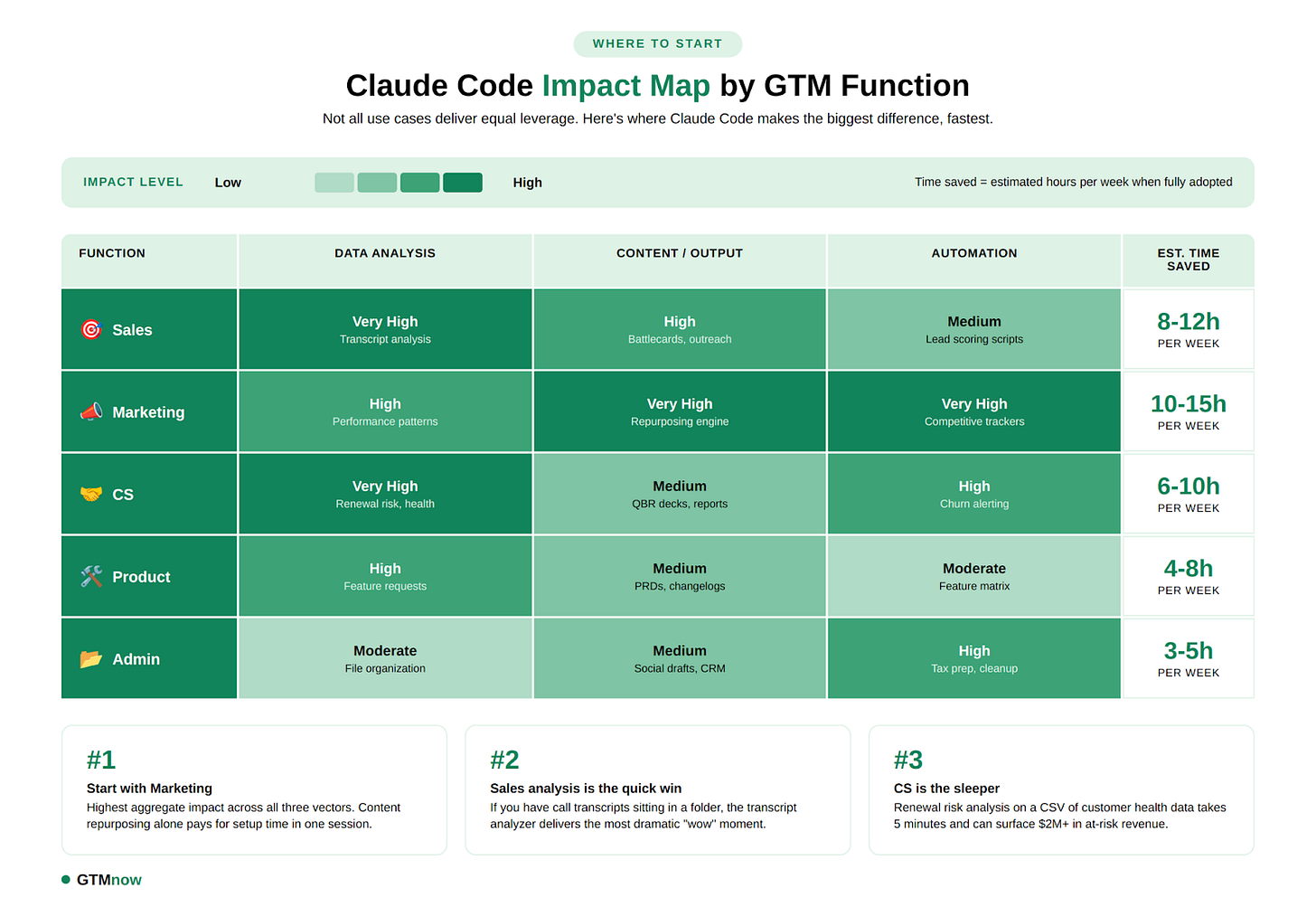
Below is a structured breakdown of real use cases across every GTM function. Each includes the scenario, the exact prompt (or prompt pattern), and where applicable, what the output looks like. We’ve organized them by function so you can jump to what’s most relevant to you.


1. Personal & Admin
The “I can’t believe I used to do this manually” category.
Organize Your Disaster of a Downloads Folder
Every operator’s Downloads folder is a graveyard of random PDFs, screenshots, and files named “final_v3_REAL_final.docx.”
Claude Code can analyze hundreds of files by type, date, and content, then reorganize them into a logical structure automatically.
Prompt: “Analyze my Downloads folder and organize everything into logical subfolders by: file type (Documents, Images, Videos), date, and project or category. Propose a plan before moving anything.”

Sort Invoices for Tax Season
Drop your messy pile of invoices and receipts into a folder. Claude Code reads each file, renames it with a standardized format, and sorts it into the right category.
Prompt: “Read each file in this folder. Rename them to ‘YYYY-MM-DD Vendor - Invoice - ProductOrService.pdf’ and move them into subfolders by quarter (Q1, Q2, Q3, Q4).”
Clear Storage on Your Machine
Instead of manually hunting for what’s eating your disk space, just ask.
Prompt: “Scan my computer for files larger than 500MB. Show file name, location, size, and last accessed date. Sort by size. Help me free up at least 20GB safely.”

Draft and Schedule Social Posts
Feed Claude Code your recent content (blog posts, transcripts, notes), and ask it to generate a week’s worth of LinkedIn posts in your voice.
Prompt: “Read all the markdown files in my /content folder. These are my recent blog posts. Generate 5 LinkedIn posts based on the most interesting insights from these pieces. Match my writing style: direct, analytical, no fluff. Save each as a separate .md file in /social-drafts.”
💡 Pro tip: Pair this with a CLAUDE.md file that contains your voice guidelines and style preferences. Claude Code reads this file automatically at the start of every session, so it always writes in your tone.
Build a Personal CRM from Your Inbox
Export your email contacts or meeting notes into a folder. Claude Code can parse them and build a lightweight relationship tracker.
Prompt: “Analyze all the .eml files in this folder. Extract: sender name, company, date, and key topics discussed. Create a CSV with columns for Name, Company, Last Contact Date, Topics, and Suggested Follow-Up. Flag anyone I haven’t contacted in 30+ days.”
2. Sales
Identify High-Quality Leads from Your Codebase or Product
This is one use case from Lenny’s roundup. If you’re a founder, run Claude Code from your app’s source directory and ask it to analyze what you’re building to suggest ideal pilot customers.
Prompt: “Look at what I’m building in this directory. Based on the product functionality, identify the top 10 companies in [your city/region] that would be ideal pilot customers. Include their likely pain points and a suggested outreach angle for each.”

Scrape Public Data for Prospect Lists
One user in Lenny’s community used Claude Code to scrape GitHub repos to find companies with sensitive data exposure, then pitched them his security product. The result: a prioritized lead list with LinkedIn URLs and a relevance score.
Prompt: “Search GitHub for public repositories that contain [specific indicator relevant to your product, e.g., hardcoded API keys, unencrypted credentials]. For each, extract: repo owner, company name if available, repo URL, and a priority score (1-10) based on severity. Export as CSV.”
Analyze Call Transcripts at Scale
Download your Gong, Chorus, or Fireflies transcripts into a folder. Let Claude Code do the work of a sales ops analyst.
Prompt: “Analyze all call transcript files in this folder. For each, extract: prospect company name, key objections raised, competitor mentions, pricing discussion points, and deal stage signals. Then create a summary report showing: (1) the top 5 most common objections across all calls, (2) which competitors are mentioned most, and (3) which calls have the strongest buying signals.”

Generate Personalized Outreach Sequences
Feed it a prospect list CSV and your product context.
Prompt: “Read prospects.csv in this folder. For each prospect, research their company using the web and draft a 3-email outreach sequence. Email 1: personalized hook based on a recent company event. Email 2: problem-specific value prop. Email 3: breakup email with a resource link. Save all sequences to /outreach-drafts as individual text files.”
Competitive Battlecard Builder
Point Claude Code at competitor websites and your own positioning docs. Get structured battlecards your reps can actually use.
Prompt: “Read our product positioning doc at /docs/positioning.md. Then research [Competitor 1], [Competitor 2], and [Competitor 3] from their websites. For each competitor, create a battlecard with their positioning, key differentiators, common objections they raise against us, our best counter-arguments, and scenarios where we win vs. lose. Save as battlecards.md.”

3. Marketing
The function where Claude Code might deliver the highest ROI per hour invested.
Competitor Ad Intelligence
Use Claude Code to pull and analyze competitor ads from Meta’s Ad Library. No more manual screenshot sessions.
Prompt: “Go to Meta’s Ad Library and search for ads from [Competitor]. Download the top 20 active ads. For each, analyze: messaging angle, CTA, visual style, and target audience signals. Create a competitive ad report with recommendations for how we should differentiate our own ad creative.”
Content Performance Analyzer
Export your blog analytics or newsletter data as a CSV. Claude Code can find patterns you’d miss in a spreadsheet.
Prompt: “Find the CSV file in my Documents folder called blog_performance_2025.csv. Analyze every post and surface patterns: which topics get the highest open rates, what headline formats perform best, what publish day/time correlates with engagement, and what content length hits the sweet spot. Create a visual report with charts.”

SEO/GEO Keyword Research Pipeline
As SEO shifts toward Generative Engine Optimization (GEO), you need to understand what AI search engines surface. Claude Code can build you a research pipeline.
Prompt: “Research the top 50 keywords in [your industry vertical]. For each, check: current SERP ranking difficulty, whether AI overviews appear for that query, estimated search volume, and our current ranking if available from /data/rankings.csv. Export a prioritized keyword matrix ranked by opportunity score.”
Repurpose Long-Form Content into Multi-Channel Assets
Feed it a blog post, webinar transcript, or podcast episode. Get back a full content repurposing kit.
Prompt: “Read /content/webinar_transcript_q4.md. From this single piece, create: (1) a 1,500-word blog post, (2) a Twitter/X thread of 8 tweets, (3) 3 LinkedIn posts with different angles, (4) 5 email subject lines for newsletter distribution, and (5) a one-page executive summary. Save each as a separate file in /repurposed.”

Build a Self-Updating Competitive Tracker
This is a power-user move. Create a script that Claude Code runs periodically to monitor competitor changes.
Prompt: “Create a script that checks these competitor URLs every week: [URL 1], [URL 2], [URL 3]. Track: pricing page changes, new feature announcements, job postings (especially in sales and engineering), and press mentions. Append changes to /competitive-intel/changelog.md with timestamps.”
4. Customer Success
Renewal Risk Analyzer
Export your customer health data or usage metrics. Let Claude Code flag accounts that need attention before it’s too late.
Prompt: “Analyze customer_health.csv in this folder. For each account, flag risk level (Green/Yellow/Red) based on: usage trend (declining = red), support ticket volume (increasing = yellow/red), NPS score (below 7 = red), and days until renewal. Create a prioritized action list for the CS team with specific suggested interventions for each Red account.”

QBR Deck Generator
Instead of spending half a day pulling data into slides, feed Claude Code your account data and let it draft the QBR.
Prompt: “Read the usage data, support tickets, and NPS survey results for [Account Name] from the /accounts folder. Generate a QBR document that includes: executive summary, usage highlights and trends, ROI metrics, support summary, product roadmap alignment, and recommended expansion opportunities. Save as a markdown file.”
Synthesize Customer Feedback at Scale
Use Claude Code to process call transcripts and map feedback against your product assumptions.
Prompt: “Read all files in /customer-calls. For each transcript, extract: feature requests, pain points, praise, and competitor mentions. Then compare these against the assumptions in /docs/product-hypotheses.md. Create a scorecard showing which hypotheses are validated, which are invalidated, and which need more evidence.”
Churn Post-Mortem Analyzer
After a wave of churn, don’t just guess at the reasons. Run the data.
Prompt: “Analyze churned_accounts_q4.csv and all related support transcripts in /churn-data. Identify the top 5 churn drivers by frequency. For each driver, include: number of affected accounts, representative quotes from transcripts, and a suggested preventive action. Create an executive summary for leadership.”
5. Product
Write Job Descriptions and Hiring Plans
Justin Bleuel from Clay shared this use case: feed Claude Code your existing hiring materials and comparable JDs from other companies. Get a complete hiring package.
Prompt: “Read the hiring materials in /hr/pm-hiring and the competitor JDs I’ve saved in /hr/reference-jds. Generate: (1) a complete job description for a Senior Product Manager role, (2) a structured interview plan with 4 rounds, (3) an evaluation rubric with scoring criteria, and (4) a 90-day onboarding plan. Save each as a separate doc.”
Self-Driving Documentation
James Pember coined this term: using Claude Code with Playwright to automatically explore your software, identify gaps in documentation, and draft the missing content.
Prompt: “Explore our application at [localhost URL] using Playwright. Compare what you find against the documentation in /docs. Identify any features, flows, or edge cases that are undocumented or poorly documented. Draft the missing documentation and save as new markdown files in /docs/drafts.”
Sprint Planning from Customer Signals
Connect the dots between what customers are saying and what your team should build next.
Prompt: “Read the feature request data in /data/requests.csv and the customer call summaries in /calls/summaries. Cross-reference against our current roadmap in /docs/roadmap.md. Recommend the top 5 features we should prioritize next sprint based on: request frequency, revenue impact (size of requesting accounts), alignment with roadmap themes, and estimated complexity. Output as a Linear-ready markdown spec.”
User Behavior Audit from Analytics Exports
Export your product analytics (Mixpanel, Amplitude, PostHog) as CSV. Let Claude Code find the behavioral patterns.
Prompt: “Analyze the event data in user_events_jan.csv. Identify: (1) the most common user paths from signup to first value moment, (2) where users drop off, (3) which features correlate with long-term retention, and (4) power user behaviors vs. churned user behaviors. Create a report with specific product recommendations.”
6. The Wild Ones
Use cases that don’t fit neatly into a function but are too good not to share.
Analyze Your Own Meeting Behavior
Dan Shipper’s personal favorite: download all your meeting recordings, and ask Claude Code to tell you where you’re avoiding conflict.
Prompt: “Read all meeting transcripts in /meetings. Identify every instance where I subtly avoided conflict, deferred a hard conversation, or softened critical feedback. For each, describe what happened and suggest what I could have said instead. Be honest.”

Build a Physical Object
John Conneely used Claude Code as a DIY subagent to design a slide tower for his son, complete with measurements, materials list, and step-by-step instructions.
Prompt: “I want to build a [describe physical project. e.g., standing desk, bookshelf, kids’ play structure]. I have access to standard lumber and basic power tools. Create: a materials list with quantities and dimensions, step-by-step build instructions, a cut list, and safety considerations. Include a simple diagram if possible.”
The finished product:

Expense Report from Receipt Photos
Dump 40 receipt screenshots into a folder. Walk away. Come back to a categorized expense report.
Prompt: “I have receipt screenshots in this folder. Create an Excel spreadsheet with columns: Date, Vendor, Category (meals, travel, supplies, other), Amount, and Description. Extract all information from the receipt images. Total by category at the bottom.”
Create a Self-Improvement Feedback Loop
Gang Rui created a slash command that analyzes journal entries alongside Git commits to spot gaps between intentions and actions, like a personal COO.
Prompt: “Analyze my journal entries in /journal (last 7 days) and my recent Git commits. Spot gaps between what I said I’d do and what I actually did. Suggest 3 system improvements to help me follow through better next week. Be specific and actionable.”
Voice Notes to Published Content
Voice-record ideas during morning walks, feed the raw audio notes into Claude Code, and get back organized research themes, a draft article in her exact voice, and LinkedIn posts ready to publish.
Prompt: “Read the voice note transcripts in /voice-notes. Organize the ideas into coherent themes. Then write a 1,200-word article based on the most compelling theme, match the writing style in /style-guide/my-samples. Also create 2 LinkedIn posts from the article. Save everything to /drafts.”
A Framework for Getting Started
If you’re feeling overwhelmed by the possibilities, here’s a simple decision tree:
- Start with a task you already hate doing manually. Tax invoices, file organization, and data cleanup.
- Create a dedicated folder. Don’t give Claude Code access to your whole machine. Scope it to a workspace.
- Describe what you want in plain English. No special syntax. Just tell it what to do as if you were delegating to a smart intern.
- Review the plan before it executes. Claude Code will tell you what it’s about to do. Read it, approve it, then let it run.
- Graduate to GTM workflows. Once you’re comfortable, move to the sales, marketing, CS, and product use cases above.

Tag @GTMnow so we can see your takeaways and help amplify them.
More for your eyeballs
OpenAI raises $110B in one of the largest private funding rounds in history. The new funding consists of a $50 billion investment from Amazon as well as $30 billion each from Nvidia and SoftBank, against a $730 billion pre-money valuation.
Profound raised $96M at a $1B valuation to help brands understand and influence how AI models like ChatGPT and Gemini talk about them. As discovery shifts from links to answers, they’re positioning themselves as the system of record for AI visibility. If you care about distribution, this is one to watch.
Anthropic introduced Claude Code Security in limited research preview. It scans entire codebases for vulnerabilities and suggests targeted patches for human review, designed to surface issues traditional security tools often miss. As AI writes more code, guardrails like this move from nice-to-have to required.
More for your eardrums
Get a sneak preview here. For the full thing, listen on Apple, Spotify, YouTube or wherever you get your podcasts by searching “The GTMnow Podcast.”
Startups to watch
Nooks – just launched AI Sequencing, extending beyond its dialer into full multi-channel outbound. Lists, research, email drafting, signals, coaching — all inside what they’re calling the Agent Workspace.
Hottest GTM jobs of the week
- Manager, Customer Success at Owner (Remote – US or Canada)
- Mid Market Customer Success Manager at Seso (Remote – US)
- Customer Success Manager, Strategic at Vanta (Hybrid – London, UK)
- Enterprise Customer Success Manager at Noibu (Hybrid – Ottawa, ON)
- Growth Development Representative at Northbeam (Hybrid)
See more top GTM jobs on the GTMfund Job Board.
GTM industry events
Upcoming events you won’t want to miss:
- Funnel ‘26: March 5, 2026 (Austin, TX)
- Spryng (for marketers): March 24–25, 2026 (Austin, TX)
- MicroConf 2026: April 12–14, 2026 (Portland, OR)
- SaaStock USA: April 15–16, 2026 (Austin, TX)
- Forrester B2B Summit: April 26–29, 2026 (Phoenix, AZ)
- SaaStr Annual: May 12–14, 2026 (San Mateo, CA)
- Dreamforce 2026: September 15–17, 2026 (San Francisco, CA)
- INBOUND: September 16–18, 2026 (Boston, MA)
- Pavilion GTM2026: September 28–October 1, 2026 (NYC, NY)
- Customer Success Week: October 5-9, 2026 (NYC, NY)
- TechCrunch DISRUPT: October 13–15, 2026 (San Francisco, CA)
GTMnow community love
Some GTMnow community (founder, operator, investor) love to close it out – we appreciate you.