After seeing the GTM unlock that MCPs provide, we teamed up with Alex Shartsis to provide a comprehensive deep dive. Alex is the founder and CEO of Skyp, AI-native outbound for high-ACV sales and advisor to AI founders. He previously led acquisitions at Opendoor, GTM at Kleiner and Sequoia backed Drawbridge, and was a founder himself.
The next big thing in AI is called MCP or Model Context Protocol. Most people still haven’t heard of MCP, but it’s arguably more important than the AI systems themselves because MCP is how LLMs like Claude actually get work done in the tools you already use.
Unlike OpenClaw or other high-risk, agentic systems, MCP enables you to keep control of your data and carefully set permissions. This is important if you’re in a larger organization where, for example, Stripe access is limited.
This article will give you everything you need to both speak intelligently about MCPs with your team and start using them for GTM.
What is an MCP and why should I care?
MCP stands for Model Context Protocol. Anthropic (the company behind Claude) invented it so that AI models like Claude could talk to other software. It’s a standard that many providers and LLMs support.
I’ll refer to Claude here for readability and because that’s how most people use MCPs, but you can substitute almost any LLM. There’s a list of supported platforms at the end of this article.
MCPs combine connectors with documentation. An MCP is essentially a self-documenting API that tells Claude what it can do and how to do it. So if you connect Claude to an MCP, Claude can figure out what’s possible on its own, try things, hit errors, work around them, and get the task done. If you ask it to do something the MCP doesn’t directly support, it often finds a workaround. For example, falling back to updating items one at a time if batch updates aren’t supported. You, the user, get your task done without reading a single line of documentation.
Anything with an MCP is now a tool Claude can use on your behalf, without you building or buying an integration. That matters because it enables a totally new way of interacting with software: by not interacting with it at all. You connect the things you use to Claude, and tell Claude to work on your behalf.
This enables much more than you might expect.
What MCPs enable
I use MCPs for everything. Why? Because with an MCP, you can tell Claude what to do and then go do something else while it works. That alone is a huge productivity unlock. You also don’t have to invest a lot of time to learn the underlying system. Claude will figure it out for you, translating your requests into what the underlying system needs to get the results you want.
Here are concrete examples of things I’ve done in the last week using MCPs:
Enriched a list of contacts from an event I attended, pulling from Apollo and verifying with an Exa or Perplexity web search
Sent an outreach campaign to that list using Skyp (my product)
Set up automatic weekly updates to our Intercom knowledge base, pulling from our engineering work
Pulled every sales conversation from the week out of Gmail, Calendar, and Grain into a single follow-up list
Set up a new enterprise customer in Stripe on a custom subscription
Built four versions of a display ad in Canva
Leveraging MCPs for GTM
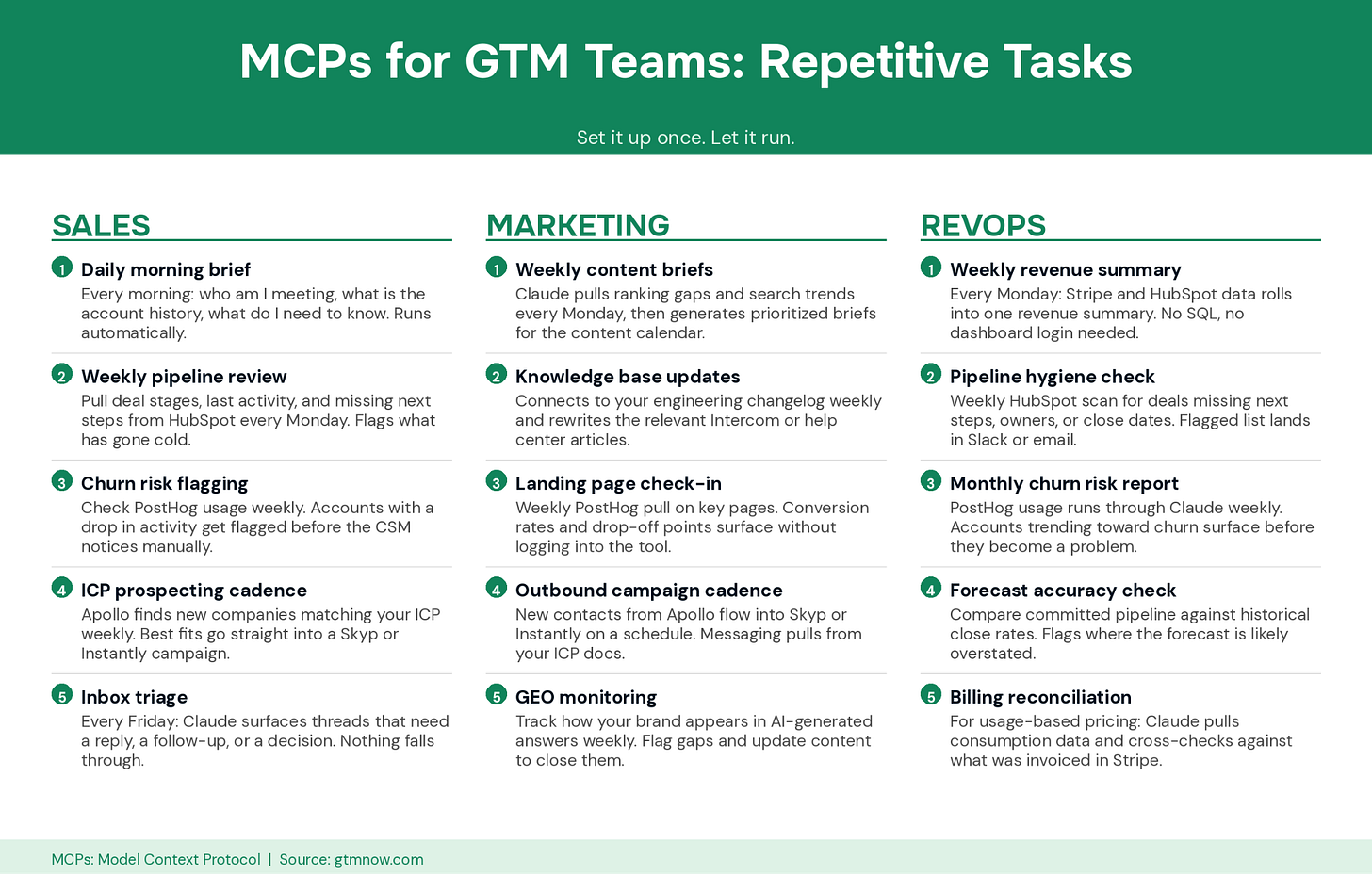
MCPs unlock a lot of capability for GTM, regardless of whether you’re in sales, marketing, or revops (revenue operations). Here are some examples.
MCPs enable two broad types of capabilities: one-off tasks and repetitive tasks.


Leveraging MCPs for GTM
MCPs unlock a lot of capability for GTM, regardless of whether you’re in sales, marketing, or revops (revenue operations). Here are some examples.
MCPs enable two broad types of capabilities: one-off tasks and repetitive tasks.
One-off tasks
MCPs let you use software the way you use a Kleenex–once, then never think about it again, making one-off tasks viable. Here are examples from different areas of GTM.
You can run an analysis of your search engine rankings or keywords in AHREFs or SEMRush using MCP, and take action to create SEO or LLM targeted content.
Build graphics for your blog posts (possibly even your SEO posts) using Canva, directly from within Claude.
For revops, the Stripe MCP is pretty amazing. You can update most pricing, packaging, and more using the MCP, instead of navigating Stripe’s complex product and pricing user interface. If you are putting together custom invoices, custom payment links, or other custom billing you can do that from your AI chat also. And you can have it check its work.
GTM execs and founders benefit from drawing reporting directly from Claude. You don’t need to figure out how to write a query against Stripe, PostHog, or HubSpot–you just ask Claude what you want.
The PostHog MCP is especially powerful for PLG teams. A salesperson with access to PostHog via MCP could target outreach that week based on product usage changes. You could flag churn risk earlier, or spot power users who might be ready to consider an upgrade earlier.
Repetitive tasks
The PostHog example might be something you’d want to run every week, not just once. This is where MCPs enable GTM teams to do what it used to require engineering resources to get done.
You can link services together and run them on a schedule. Claude can set up tasks that run repetitively. That capability varies across Claude products (chat, Cowork, Code), but it exists in some form in all of them. MCP add the connectivity.
For our Apollo-Skyp campaign example, you can wire that into a repeat task. You can also leverage MCPs like Skyp to add steps to handle other motions. For example, take web visitors identified by RB2B, check them against HubSpot, and add them to a campaign based on whether they’re new, closed-lost, or some other status. If they are new, you could possibly enrich with Apollo or Perplexity.
All of this was possible before MCPs, it was just a lot more work. GTM teams couldn’t experiment to find what worked for them by hand because the tools weren’t accessible. With MCPs it’s a 15-minute chat with Claude, and then it just runs. Hourly, daily, weekly–whatever you want.
MCPs and your accumulated knowledge
MCPs multiply the value of whatever context you’ve given Claude about your business.
GTMnow recently ran a great piece on how top GTM teams are giving Claude a persistent “brain”–company context, ICP definitions, positioning, voice guides. If you’ve been building that kind of shared knowledge, MCPs are what make it operationally useful. Claude can read everything you’ve taught it about your business and then actually go do things in your stack on the basis of that knowledge.
Without MCPs, all that context just makes Claude a better writer. With MCPs, it makes Claude a better operator. It enriches with your ICP in mind. It can find your ICP in a pile of contacts it pulls from somewhere, whichever tool will be best suited. It checks your CRM before drafting a follow-up. The context compounds with the connectivity in a way neither does alone.
But is MCP really this good?
Like anything, there are tradeoffs. For MCPs, that is cost and stability.
MCPs use your Claude tokens to communicate. Most people won’t notice, as these tokens are drawn from your monthly subscription (which have generous allocations) but if you’re doing heavy work with MCPs, you’ll hit your paid limits more often, especially on Opus.
The solution is to switch to direct API usage once you’re confident in a particular workflow. That usually means moving from Chat (including Cowork) to Claude Code (or Cursor) and having the AI write reusable code for you. Most people never need to get there, but there is a path, if you need it.
Providers of those MCPs can be another unpredicted cost. If you tell Claude to enrich a list and it’s 100,000 rows long, it will, regardless of the cost. Scope your prompts carefully, and for high-cost actions, ask it to confirm first. For enrichment tasks, which are more complex than most people realize, setting up a priority order of APIs based on expense is crucial. Most (not all) MCPs provide cost or usage endpoints, which can help mitigate this risk.
Stability is the other challenge with MCPs you may run into if you use them enough. Almost every MCP on the market is in some form of alpha or beta, even when it doesn’t say so on the tin. MCP is less than two years old as a technology, and everyone is still figuring it out.
Practically, that means things break. Connections drop, schemas change, stuff fails unpredictably. For one-off tasks you won’t notice, you just try again. For ongoing workflows, you have to monitor things. It’s not the same as a stable integration your engineering team built.
Which providers support MCP?
Claude is the go-to tool for GTM teams right now, largely because its MCP support is the most mature. Other tools are catching up. Cursor has supported MCPs for a while, and you can use any model inside it, which can have cost advantages. But for most GTM people, Claude’s chat interface is the fastest path from “I want this” to “it’s done.” That said, ChatGPT recently added support for MCP on some of its plans.

Within Claude I use Sonnet for most of my work because it’s about 20% of the cost of Opus and just as good for most tasks. For longer chains with a lot of reasoning (download this, research it, think about it, upload it somewhere else) Opus is sometimes worth the spend. Each model has strengths and weaknesses.
Where to Start: How to prioritize your MCP stack
Most people who try MCPs make the same mistake: they connect everything at once, hit a broken workflow or a dropped connection, and conclude that MCPs aren’t ready. The problem isn’t MCPs. It’s sequencing.
Build your MCP stack the same way you’d build any operational system. Start where the return is immediate, build the habit, then layer complexity on top of a foundation that’s already working.
Before connecting anything, run it through two questions:
How often will I actually use this?
How much effort does it take to set up and maintain?
That gives you four tiers and a clear order of operations.
Tier 1: Connect today (High frequency, Low setup)
These MCPs have the shortest path from “connected” to “useful.” You’ll interact with them daily, the configuration is minimal, and the payoff is visible within hours.
Your Productivity Layer belongs here. Email, calendar, and team messaging are the tasks every GTM person does every single day, and they’re exactly what Claude handles well with minimal context. Pre-call briefs, follow-up drafts, Monday morning triage, surfacing the threads that actually need attention. If you do nothing else with MCPs, connect these.
What you’re building here is the habit of talking to Claude instead of opening tabs. Everything else sits on top of this.
Tier 2: Connect this week (High frequency, Moderate setup)
These MCPs take slightly more configuration but compound fast enough to be worth the early investment.
Research & Prospecting is the core unlock. Once connected, you go from “find companies that look like our best customers” to a qualified list without leaving Claude. Pair it with Outreach & Sequencing and you’ve collapsed a multi-tool workflow into one conversation: research, qualify, enrich, and launch a cadence in the same session.
Product & Usage Signals is the layer most GTM teams underestimate. A salesperson who can ask Claude what an account did in the product last week before a call has a structural advantage. A marketer who can check landing page performance without logging into a separate analytics tool moves faster. The MCP makes the data accessible without requiring anyone to learn the tool.
Meetings & Follow-up earns its place here because of how it interacts with everything else you’ve already connected. The transcript alone isn’t the value. It’s that Claude can pull the transcript into the same conversation where it has your email, your calendar, and your CRM context, and draft a follow-up that actually reflects what happened in the meeting.
SEO & Content Research if you have a content or growth function. Running a keyword gap analysis or pulling a content brief in natural language instead of navigating a separate UI is a meaningful time save, especially for teams producing content at volume.
What you’re building here is a connected intelligence layer across prospecting, product signals, and conversations. This is where MCPs stop feeling like a productivity trick and start feeling like an operational advantage.
Tier 3: Connect when you have a specific use case (Lower frequency, Higher setup)
These are powerful for specific workflows but not where most GTM teams should start. The setup is more involved, the permissions are more sensitive, and the failure modes are more consequential.
CRM & Pipeline belongs here, especially at enterprise scale. Lightweight CRM querying can sit in Tier 1 if you’re in it daily, but full enterprise CRM access is powerful and not something you want to configure under time pressure with unclear permissions. Get your foundation working first, then layer this in.
Content & Creative sits here not because it’s risky but because it’s situational. If you’re producing a lot of visual content or working closely with design, it’s a strong unlock. If you’re not, it doesn’t earn a Tier 2 spot.
What you’re building here is depth in the workflows where your team spends significant time or money. These are force multipliers once the foundation is solid.
Tier 4: On your radar (Emerging, Worth watching)
The MCP ecosystem is less than two years old and moving fast. Several connectors are in early stages but will likely graduate to Tier 2 within the year.
Don’t build workflows around these yet. Do start asking every new vendor you evaluate whether they support MCP. It’s a fast signal for how seriously they’re thinking about AI-native interoperability, and a reasonable proxy for how quickly they’ll ship what you actually need.
The rule that ties it together
Every week, add one new MCP from the next tier. Not five. One. Test it against a real workflow, not a toy example. If it breaks, diagnose whether the issue is the MCP, the prompt, or the underlying tool. Most instability at this stage is fixable with tighter scoping, not a reason to abandon the connector.
The teams that treat MCP connectivity as infrastructure, something they build deliberately and maintain, will compound the advantage of everything else they’re already doing. The teams that treat it as experimentation will stay in Tier 1 forever.
Start with the productivity layer. Add one category per week. Within a month, Claude stops being a writing tool and starts being an operator.
MCPs to try now
Above are common MCPs for GTM teams, many of which I use regularly. For example, these are in my daily stack:
Gmail and Google Calendar. The lowest-effort, highest-frequency unlock. Pre-call briefings from your calendar (”what do I need to know about my 2pm?”), follow-up drafts from your inbox, Monday-morning triage. If you do nothing else, connect these two.
Skyp. You can create outbound, warm, or revival email and LinkedIn campaigns from Claude, and because the context flows through the MCP, the emails actually sound like you, not like every other AI-drafted email the prospect has seen this week.
PostHog. PostHog’s MCP lets you ask Claude questions about what’s happening on your website. Marketers can check landing page performance without opening PostHog. Salespeople can check a customer’s product usage before a call.
Grain. I use Grain to record meetings because they were one of the first with an MCP. The real value is that Claude can pull the transcript into the same chat where it also has access to your email and calendar, and then draft context-aware follow-ups. Claude tends to write better follow-ups than the recorder’s built-in summary, because it has more context to draw from. Granola is another popular choice with a MCP.
GTM leaders are leveraging MCPs every day. Try a few of these, you can get a ton done in a short amount of time.
If nothing else, as you evaluate new vendors going forward, start asking whether they support MCP. It’s a good way of gauging how quickly companies are innovating and whether they’ll be a good fit for your needs both now and in the future.
Tag GTMnow so we can see your takeaways and help amplify them.
More for your eyeballs
Cerebras Systems, a Silicon Valley-based AI chipmaker, raised $5.6 billion in its IPO. Cerebras Systems (NASDAQ: CBRS) completed its blockbuster initial public offering on May 14, 2026, marking the largest tech listing in the U.S. since 2019.
The 2026 Early-Stage GTM Report is out from Mercury Fund, built from 125+ B2B software leaders. The findings show that AI has moved from experiment to infrastructure (96% call it a top priority, multi-LLM is now standard), and teams are responding by automating high-volume process roles while hiring for judgment-driven ones like AEs and Events.
ElevenLabs crossed $500M ARR, up from $350M at end of 2025 in just four months. The Series D brings in BlackRock, Wellington, Nvidia, Santander, and 30+ creatives including Jamie Foxx and Eva Longoria.
More for your eardrums
VC: “Software Is Basically Worth Zero Now” | Tyler Hogge, Ex-Pelion
GTM 190: Inside Reevo’s $80M Bet to Kill the $10B Frankenstein Stack | David Zhu, Cofounder & CEO
AI Infrastructure, Distribution, and the Next Wave of Software on AI + a16z podcast | Available on Apple and Spotify
Listen through the links in the page above or by searching wherever you get your podcasts “The GTMnow Podcast.”
Startups to watch
Gaiia – raised $40M Series B led by JMI Equity to fix telecom’s software problem. Telecom has the lowest NPS of any major industry, not because operators don’t care, but because legacy OSS/BSS makes great experiences impossible. Gaiia is rebuilding it as a system of action.
Village – raised $9.5M led by Upfront Ventures, with participation from GTMfund, to fix specialty pediatric care. Nearly 1 in 5 U.S. kids face developmental, behavioral, or mental health needs and most families are left quarterbacking fragmented providers alone. Village brings the care team together in one place.
Hottest GTM jobs of the week
- Enterprise Account Executive at Centari (New York, NY)
- Founding Business Development Representative at Centari (New York, NY)
- Enterprise Customer Success Manager at Gorgias (Toronto, Canada)
- Revenue Operations Manager at Esper (Hybrid – Austin, TX)
- Account Development Representative, Customer Accounts at CaptivateIQ (Hybrid – Austin, TX)
- Customer Support Representative at Closinglock (Austin, TX)
- VP of Brand at Vanta (Remote – US)
See more top GTM jobs on the GTMfund Job Board.
GTM industry events
Upcoming events you won’t want to miss:
- RevStar Summit: June 3, 2026 (Toronto, Canada)
- GTMfund Dinner: June 9, 2026 (London, UK)
- Dreamforce 2026: September 15–17, 2026 (San Francisco, CA)
- INBOUND: September 16–18, 2026 (Boston, MA)
- Pavilion GTM2026: September 28–October 1, 2026 (NYC, NY)
- CVC Week by Counterpart Ventures: September 29, 2026 (San Francisco, CA)
- Customer Success Week: October 5-9, 2026 (NYC, NY)
- TechCrunch DISRUPT: October 13–15, 2026 (San Francisco, CA)
GTMnow community love
Some GTMnow Network love to close it out – we appreciate you.