The first Claude Code edition we published gave you 30+ use cases across every GTM function. Beyond the core functions, a few fun wild ones were included. Since that edition, we’ve been getting a flood of questions about broad-reaching personal productivity use cases, in addition to GTM ones. So that’s what what this edition is all about!
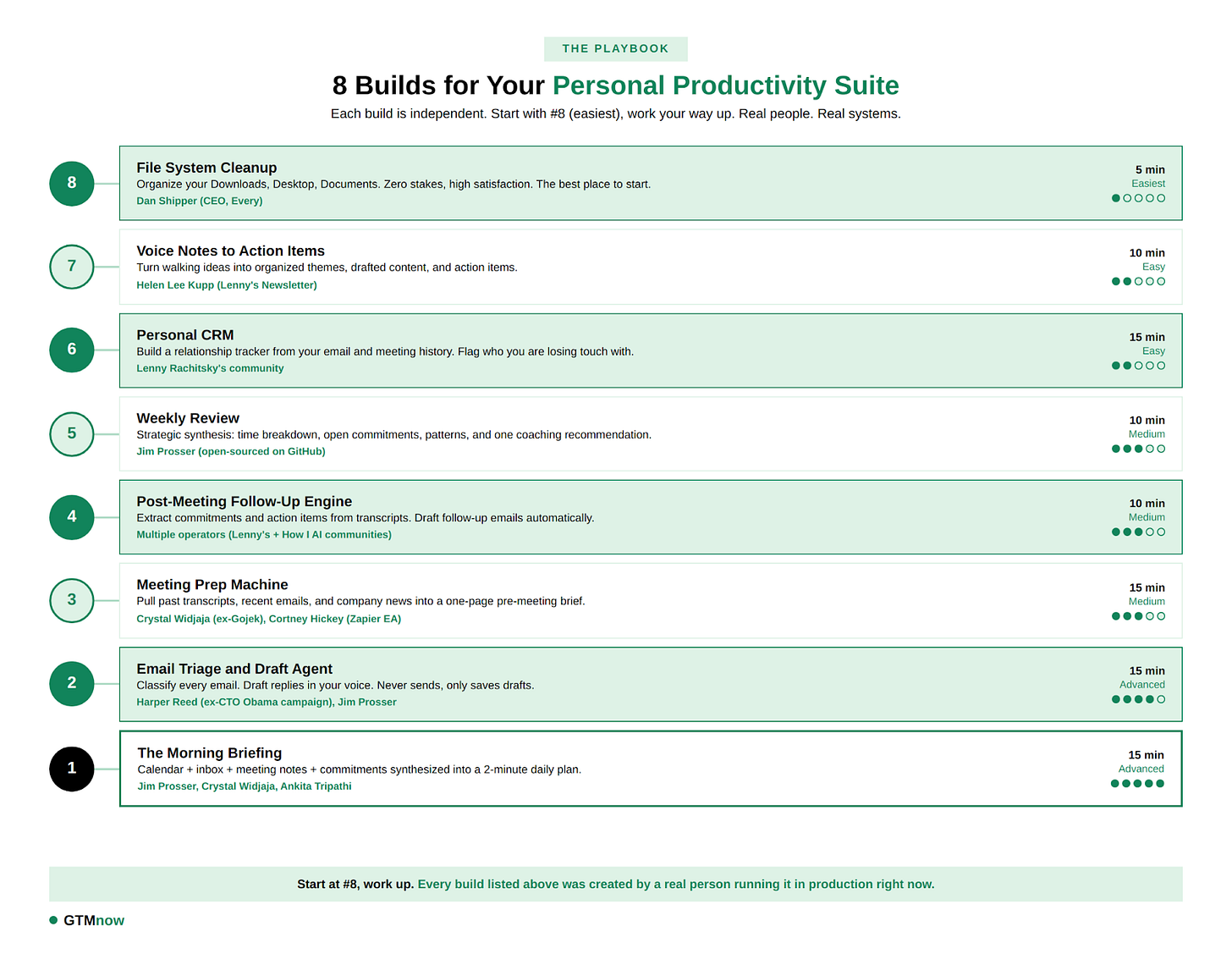
This edition breaks down 8 specific builds you can copy. Each one includes the exact setup, the workflow, and the prompt to get started. Plus, an example of someone who has built it. Pick one and try it tomorrow. Then try another.


HockeyStack is the AI platform for modern GTM teams. It unifies all your sales and marketing data into a single system of action. Built-in AI agents help teams prospect the right accounts, improve conversions, close and expand deals, and scale what works.
That’s why teams like RingCentral, Outreach, ActiveCampaign, and Fortune 100 companies rely on HockeyStack to eliminate wasted spend, take better decisions, and make space to think. Learn more at hockeystack.com

Nooks is breaking the mold. With their new AI Sequencing product, Nooks is an agent workspace where AI works alongside reps, helping them understand accounts, prioritize the right prospects, and generate context-rich outreach based on actual first-party interactions.
No more wasting time in multiple tools – it’s one unified workspace for all your outbound channels. Arm your sales team with intelligent outbound. Learn more at nooks.ai.
Before You Build Anything: The 10-Minute Foundation
Every single person who shared their build emphasized the same starting point: Context. It’s also the number one cited thing from AI experts on what people could do to improve their output.
Claude is only as good as the context you give it. Without context, you get generic output.
The foundation is a single file called CLAUDE.md. Create a folder (~/my-productivity or whatever you prefer), and inside it, create this file with four sections:

Who you are. Your role, company, team size, what you are responsible for. Think of this like a briefing: “VP of Sales, Series B SaaS, 12-person team, $8M ARR, selling to mid-market” gives Claude infinitely more context than “sales leader.”
How you work. Your communication style, preferences, and quirks: “Short sentences. No exclamation marks in professional emails. I end every meeting by restating action items. I prefer Slack for internal and email for external. My reports send updates on Monday mornings.” Think of this like the nuances of how you operate.
What matters right now. Your top 3 to 5 priorities this quarter. This gives Claude a filter for what is urgent versus what is noise: “Close the Acme enterprise deal by March 30. Hire a senior AE by end of Q1. Reduce sales cycle from 45 to 35 days. Launch the partner program pilot.” Update this weekly. It changes your output quality immediately.
Key people. The 10 to 15 people you interact with most. Their names, roles, and how they prefer to communicate: “Sarah (CEO): prefers short Slack DMs, never email for internal stuff. Marcus (CRO): loves data tables, hates narrative paragraphs. Jordan (top AE): responsive on Slack after 3pm, prefers voice notes.” This lets Claude adapt tone per recipient when drafting communications.
This file takes 10 to 20 minutes to write. It is the single highest-leverage thing you can do. The more context Claude has, the better every build performs.
The real skill needed here is learning to articulate your own workflows precisely enough that a machine can execute them. The CLAUDE.md forces you to be explicit about how you actually work. That exercise, even before Claude does anything, is valuable.
Build 1: The Morning Briefing
What it does: Pulls your calendar, inbox, meeting notes, and open commitments into a single, prioritized daily briefing you can scan in 2 minutes.
The setup: Connect Claude to Google Calendar, Gmail, and Granola (or your meeting notes tool of choice). In Claude Code, this happens through MCP server connections. In Cowork, these are built-in connectors you enable in settings. If you use Otter, Fireflies, or another transcription tool, export your transcripts as text files into a dedicated folder.
The prompt:
“Run my morning briefing. Pull my calendar for the next 24 hours. For each meeting, include who is attending, what we discussed last time we met (check recent transcripts), and any prep I should do. Check my Gmail for emails from the last 12 hours that need a response, prioritizing emails from [list your VIPs: CEO, key clients, board members]. Check my recent meeting transcripts for commitments I made that I have not yet acted on, specifically phrases like ‘I will send,’ ‘I will follow up,’ ‘let me check on that,’ or ‘I will get back to you.’ Give me: (1) Today’s schedule with context for each meeting, (2) the 3 most urgent emails and why they are urgent, (3) open commitments from recent meetings with their original deadline, (4) a suggested focus plan that protects at least one 90-minute deep work block.”

Why it works: Most people start their day by opening their inbox and reacting to whatever landed on top overnight. The morning briefing flips that. You start with a synthesized view of what actually matters. It surfaces commitments you forgot you made. It flags the email from your CEO that is buried under 40 newsletters. It tells you that your 2pm meeting is with someone you promised a follow-up to last Tuesday.
People are running this as an automated Claude Code start hook. When you open Claude Code in the morning, the briefing runs automatically. No prompt needed. The briefing is waiting for you. For most people, running it manually with a single prompt is enough, but if you want to take it a step further you could give that a try.
Examples of people who do this: Jim Prosser (open-sourced on GitHub, March 2026), Crystal Widjaja (published on Substack), Ankita Tripathi (published on Medium, January 2026)
Build 2: The Email Triage and Draft Agent
What it does: Reads your inbox, classifies every email into categories (respond, FYI, action needed, skip), and drafts replies that sound like you wrote them. The non-negotiable rule we recommend: it saves drafts only. It never sends.
The setup: Connect Claude to Gmail via MCP server or Cowork connector. Make sure your CLAUDE.md has a section on communication style with real examples of emails you have sent.
The prompt:
“Read the 25 most recent emails in my inbox. For each one, classify it into one of four categories: (1) NEEDS RESPONSE: draft a reply in my voice, matching the tone and formality of the thread. Reference context from recent meetings or past emails if relevant. Save as a draft in the sender’s thread. (2) FYI ONLY: summarize in one sentence. (3) ACTION REQUIRED: extract the specific action I need to take, who is asking, and the deadline. (4) SKIP: newsletters I do not read, automated notifications, cold outreach, spam. For any email involving pricing, contracts, legal matters, hiring decisions, board communications, or anything relationship-sensitive, draft a response but flag it with [HUMAN REVIEW] and a note explaining why this needs my personal attention before sending.”
Why it works: The average person receives 120+ emails per day. Most people spend hours on email, and most of that isn’t writing – it’s deciding what to do with each message, recalling the context of the thread, and matching the appropriate tone. Claude handles all of that. You just review the drafts and hit send on the ones that are ready.
Examples of people who do this: Harper Reed (published on his blog, December 2025), Jim Prosser (open-sourced)
Build 3: The Meeting Prep Machine
What it does: Before any meeting, it pulls your history with that person or company: past meeting transcripts, recent email threads, their company’s latest news, and any open commitments from either side. Delivers a one-page briefing so you walk in fully prepared.
The setup: This build requires Granola (or another meeting notes tool) connected to Claude.
The prompt:
“I have a meeting with [Name] from [Company] at [time]. Prepare a meeting brief. Pull: (1) the last 3 meeting transcripts where this person was an attendee, (2) any email threads between us from the last 30 days, (3) search the web for their company’s latest news, press releases, and blog posts from the last 60 days, (4) check if there are any open commitments from either side in previous meeting notes. Give me a one-page brief with: a summary of our relationship and recent interactions, the key topics from our last conversation, any open commitments, their company’s recent strategic moves, and 3 strong opening questions I can ask based on what is happening at their company right now.”
Why it works: Walking into a meeting without context is walking in with a disadvantage. Prep can take a while: 15 minutes of digging through old emails, searching Slack, trying to remember what was discussed. This compresses that to a 30-second read. The opening questions are particularly powerful because they signal that you pay attention and care about their business.
Examples of people who do this: Crystal Widjaja (Granola + Obsidian integration), Cortney Hickey (Zapier’s EA), Reid Robinson (Zapier’s Lead PM for AI).
Crystal’s approach: She built a custom Granola sync script (Python, open for anyone to modify) that auto-exports meeting transcripts into her Obsidian vault. Claude Code reads the vault, the calendar, and Gmail together. The context is unified. Every meeting prep draws from the full history, not just what you can remember.
Reid’s approach: He uses Claude with Zapier’s MCP integration for strategic intelligence gathering before events. Before attending industry conferences, he asks Claude to research every attendee using Zapier’s CRM and web search capabilities. He walks in with instant context on every person he is meeting.
Build 4: The Post-Meeting Follow-Up Engine
What it does: After a meeting ends, it reads the transcript, extracts every commitment, action item, and decision, and drafts a follow-up email confirming everything.
The prompt:
“Read the Granola transcript from my meeting that just ended with [Name/Company]. Extract: (1) every commitment I made, with the exact quote where I said it and the deadline if one was mentioned, (2) every commitment they made, (3) decisions that were finalized during the call, (4) topics that were raised but deferred or need follow-up, (5) any next meeting or checkpoint that was discussed. Draft a follow-up email that: opens with a thank-you, summarizes the 2 to 3 key outcomes, lists all action items with owners and deadlines, and proposes a next step. Match the tone to the relationship (formal for new prospects, casual for existing clients). Save as a draft.”
Why it works: The gap between “great meeting” and “nothing happened” is almost always a missing follow-up. Research from Gong shows that deals with a follow-up email sent within 24 hours close at significantly higher rates than those without. This build closes that gap in 60 seconds after the meeting ends. And critically: when tomorrow’s morning briefing runs, it will check whether you have acted on those commitments. The builds feed each other.
Examples of people who do this: Multiple operators across the GTMfund community.
Build 5: The Weekly Review
What it does: Steps back from daily execution and gives you a strategic view of your week. What you accomplished, what fell through the cracks, how your time broke down. And one specific coaching recommendation.
The prompt:
“Run my weekly review. Analyze the past 7 days: (1) list every meeting I had with a one-line summary of the outcome or key decision from each, (2) list all commitments I made this week from meeting transcripts and emails, and flag their current status: completed, in progress, or overdue, (3) calculate how my calendar time broke down by category: external meetings vs. internal meetings vs. focus time vs. admin vs. unscheduled time, (4) analyze my email volume: how many emails did I send vs. receive, and what percentage were proactive (I initiated) vs. reactive (I responded). Give me: a one-paragraph executive summary of what I accomplished this week, the 3 biggest open items carrying into next week, any patterns I should be aware of (recurring time wasters, growing commitment backlog, declining focus time), and one specific recommendation for how I should structure next week differently.”
Why it works: Most people’s weeks happen to them. The weekly review is the antidote. It shows you patterns invisible in real-time. Are you spending 70% of your time in meetings and wondering why strategic work never gets done? Are your commitments piling up faster than you clear them? Are you sending 80% reactive emails and only 20% proactive ones?
After a few weeks of running these reviews, the coaching recommendations become genuinely valuable. “This is the third week where your Wednesday afternoon focus block was interrupted by unscheduled calls. Consider blocking that time as a recurring calendar hold.”

Examples of people who do this: Multiple operators across the GTMfund community.
Build 6: The Personal CRM
What it does: Builds and maintains a lightweight relationship tracker from your email and meeting history. Surfaces who you are losing touch with and who you should re-engage.
The prompt:
“Scan my Gmail sent folder and Granola meeting transcripts from the last 90 days. For every external contact I have interacted with more than twice, create an entry with: Name, Company, Role (if identifiable from email signature or meeting context), last contact date, key topics discussed across all interactions, relationship strength (high/medium/low based on frequency and depth of interaction), and any open action items from our last exchange. Flag anyone I have not contacted in 30+ days who has a ‘high’ relationship strength. Also flag anyone who I have had 3+ meetings with but have not emailed in 2+ weeks. Export as a CSV file and also save as a formatted markdown file.”
Why it works: The average person’s network decays at a rate of roughly 5% per quarter when not actively maintained. This build creates the relationship layer that most people are missing. Run it monthly. The “fading relationships” flag alone has been called the most useful output by operators who use it, and a pro tip is connecting other places of communication like DMs.
Examples of people who do this: Multiple Pre-Seed and Seed founders in the GTMfund portfolio.
Build 7: The Voice Notes to Action Items Pipeline
What it does: Takes raw voice notes recorded during walks, commutes, or between meetings and turns them into organized themes, drafted content, and specific action items.
The prompt:
“Read all voice note transcripts in /voice-notes from the past week. These are raw, unstructured recordings of my thinking. For each one: (1) extract any action items or commitments I mentioned (things I said I need to do, people I said I need to contact, ideas I said I should explore), (2) identify the main ideas, themes, or insights. Then: (a) group the themes into coherent clusters, (b) for the most compelling theme, draft a 500-word article or memo that captures the insight clearly, (c) create 2 LinkedIn posts based on the best ideas, matching my writing style from CLAUDE.md, (d) compile all action items into a single prioritized list with suggested deadlines. Save each output as a separate file in /drafts.”
Why it works: Most people’s best thinking happens away from a screen. Morning walks, commutes, the shower, between meetings. This helps to ensure your walking ideas turn into value, however you end up using them.
Examples of people who do this: Helen Lee Kupp (published in Lenny’s newsletter).
Build 8: The File System Cleanup and Organization
What it does: The simplest build on this list and the best place to start if you are new to Claude Code. Claude organizes your messy folders: Downloads, Desktop, Documents.
The prompt:
“Analyze my Downloads folder. For every file, identify: file type, apparent project or topic (based on filename and content if readable), file size, and last modified date. Propose a folder structure that organizes everything logically by: (a) file type (Documents, Spreadsheets, Images, Videos, Code, Archives), (b) project or topic where identifiable, (c) a subfolder called ‘Large Files Over 100MB’ for anything big, and (d) a subfolder called ‘Older Than 6 Months’ for anything that has not been accessed recently. Show me the proposed plan with file counts per category and estimated storage savings before moving anything. After I approve, execute the reorganization, rename any files that have unclear names (like ‘IMG_4782.jpg’ or ‘Untitled-3.pdf’) to something descriptive based on their content, and create a summary log of every file moved with its old and new location.”
Why it works: Super easy and rewarding to see messy files organized. This is the build that gives people the “aha moment” when they’re getting started. It is also legitimately useful: most people have 200+ files in their Downloads folder accumulated over months or years (guilty!). You’ll also likely free up lots of storage from duplicate files, obsolete downloads, and ancient screenshots they forgot existed. It is the best on-ramp to Claude Code because you see results immediately, the risk is near-zero (Claude shows you the plan before executing), and the satisfaction of a clean file system is immediate.
Examples of people who do this: Dan Shipper (CEO of Every), multiple operators in the first GTMnow Claude Code edition.
The Pattern Across All 8 Builds

If you look at what these operators built, a clear pattern emerges across every system:
1. They all start with context, not prompts. The CLAUDE.md file, the Granola transcripts, the email history, the sent folder patterns. Every operator emphasized that output quality is directly proportional to context quality. The prompt is the last thing you write. The context is the first.
2. Keep humans in the loop at critical moments. Nobody should be letting Claude send emails or make decisions unsupervised. The system drafts, the human decides. Claude triages, the human prioritizes. Claude flags commitments, the human decides which ones to honor. As I like to say: “don’t outsource your judgment.” It’s about eliminating the 80% of work that is information retrieval, context assembly, and formatting. The 20% that is strategy and relationships stays human.
3. They all compound over time. The morning briefing catches commitments extracted from yesterday’s post-meeting follow-up. The email draft agent uses meeting context from the prep machine. The weekly review spots patterns across all the other builds. Each system feeds the others, and the more you use them, the richer the context becomes and the smarter the outputs get. This is the fundamental difference between a single prompt and a system.

The GTMfund team has a Claude and AI working session on Friday next week, so undoubtably there will be more Claude editions coming soon 🤖
Tag @GTMnow so we can see your takeaways and help amplify them.
More for your eyeballs
Apollo.io acquired Pocus, bringing signal intelligence directly into its GTM platform alongside 230M+ contacts and agentic workflows. The bet: revenue teams shouldn’t need a separate tool to know where to focus. Worth watching how this plays out upmarket, where Apollo has seen 400%+ growth in enterprise accounts over the past year.
The State of GTM Engineering report is out. Worth a read if you’re rethinking how your revenue engine is built.
Bobby Morrison, former CRO of Shopify, published 10 Practical Lessons From Building an AI-Native Company and the core argument is: AI fails when treated as a technology initiative instead of an operating model. Democratized experimentation beats centralized governance every time. The section on managers is worth the read alone.
More for your eardrums
VC Episode with Brett Queener What wins when anyone can build anything?
GTM 183: Inside ServiceNow’s $10B GTM Engine with Paul Fipps
Listen and subscribe wherever you get your podcasts by searching “The GTMnow Podcast.”
Startups to watch
Examen – raised $4.3M in total funding and launched. Examen is building an autonomous analyst for commercial real estate. GTMfund is proud to have led the Seed round.
Wyllo – the newly combined NoFraud and Yofi, is reframing fraud prevention as an intent problem rather than a binary approve-or-decline decision. If the thesis lands, risk stops being a cost center and starts informing growth. One to watch for ecommerce teams tired of black-box tools that block as much revenue as they protect.
Gumloop – raised a $50M Series B from Benchmark. They are bringing no-code AI agent building to every employee, not just engineers.
Hottest GTM jobs of the week
- Senior Customer Solutions Manager at Esper (Hybrid – Austin, TX)
- Senior Manager Demand Generation (ABM & Revenue Marketing) at Vividly (Remote – US)
- Head of Sales, Enterprise & Strategic at Vanta (Remote – US)
- Account Executive, SMB at Gorgias (Hybrid – Paris, France)
- Strategic account executive at Writer
See more top GTM jobs on the GTMfund Job Board.
GTM industry event
Upcoming events you won’t want to miss:
- Spryng (for marketers): March 24–25, 2026 (Austin, TX)
- MicroConf 2026: April 12–14, 2026 (Portland, OR)
- GTMfund Dinner: April 14, 2026 (Austin, TX)
- SaaStock USA: April 15–16, 2026 (Austin, TX)
- Forrester B2B Summit: April 26–29, 2026 (Phoenix, AZ)
- SaaStr Annual: May 12–14, 2026 (San Mateo, CA)
- GTMfund Dinner: May 14, 2026 (San Francisco, CA)
- GTMfund Dinner: June 9, 2026 (London, UK)
- Dreamforce 2026: September 15–17, 2026 (San Francisco, CA)
- INBOUND: September 16–18, 2026 (Boston, MA)
- Pavilion GTM2026: September 28–October 1, 2026 (NYC, NY)
- Customer Success Week: October 5-9, 2026 (NYC, NY)
- TechCrunch DISRUPT: October 13–15, 2026 (San Francisco, CA)
GTMnow community love
Some GTMnow community (founder, operator, investor) love to close it out – we appreciate you.